

Most software companies and service providers don’t lose deals at the contract stage. They lose momentum right after it — in the weeks between signature and go-live, when a new client’s data has to move out of whatever system it lives in today and into yours.
That step has a name, and it is worth naming clearly: customer data onboarding. It is the most underestimated part of client implementation, and for firms whose revenue depends on onboarding client after client — ISVs, BPOs, managed service providers, and the consulting teams delivering on their behalf — it is usually the constraint on how fast the business can grow.
The excitement of a closed deal fades quickly when both sides realize how messy the data handoff is. And for the client, a painful onboarding experience — errors, delays, unexpected homework — becomes the first real impression of your platform. Not the demo. Not the sales process. The data migration.
It doesn’t have to work that way.
What is customer data onboarding?
Customer data onboarding is the process of moving a new client’s existing data into your system so they can start using it — mapping their fields to your data model, reformatting values to match it, validating quality, and loading the result into your platform. It is the data-side half of client implementation, and it is what stands between a signed contract and a live, revenue-generating account.
It is often confused with two adjacent things, so it is worth separating them:
- Data onboarding vs. data migration. Data migration is the general practice of moving data between systems. Customer data onboarding is a specific, recurring instance of it — the same migration problem, solved again for every new client, with a different source system each time.
- Data onboarding vs. customer onboarding. Customer onboarding covers the whole client experience: kickoff, training, configuration, adoption. Data onboarding is the technical dependency underneath it. Everything else in the onboarding plan waits on the data.
That recurring quality is the important part. A one-time enterprise migration is a project. Customer data onboarding is a capability — something your business does dozens or hundreds of times a year. Firms that treat it like a project every time hit a ceiling. Firms that build it into a repeatable capability do not.
Why client data is the bottleneck in onboarding
We’ve watched this play out from both sides of the table, and the sequence barely varies. A new client signs. The first substantive ask is “please send us your data in our format.” The client takes a pass at it. It fails validation. They try again. Still wrong. Eventually someone brings in a specialist or a third-party firm to bridge the gap — adding weeks, cost, and frustration on both sides.
The failure points we see are remarkably consistent, whatever the industry or the source system:
Inconsistent source formats. Clients hand over overloaded spreadsheets, fragmented exports, or dumps from systems that were never designed to hand data to anyone else. Almost none of it matches your data model out of the box.
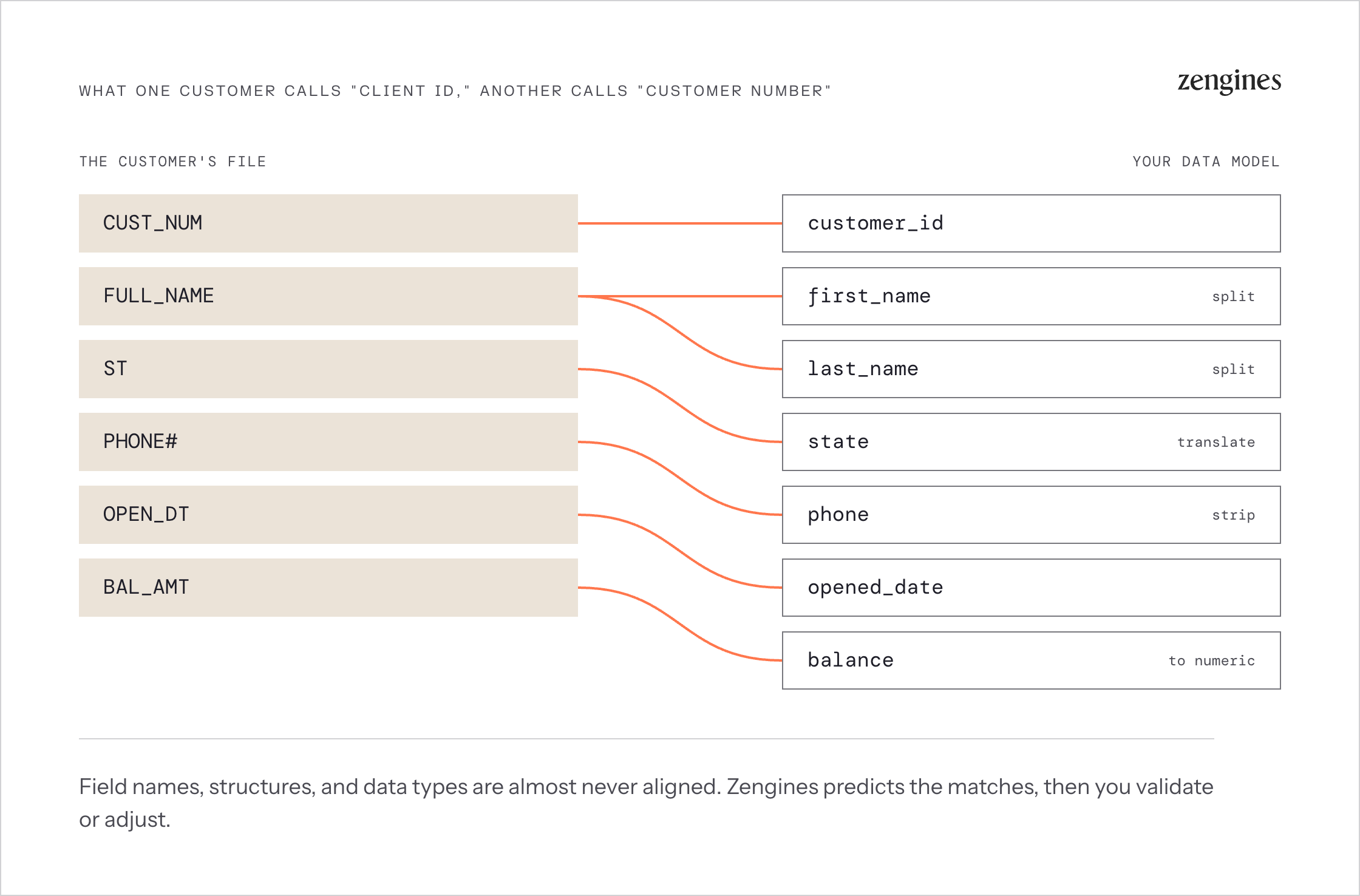
No shared vocabulary. What one client calls “Client ID,” another calls “Customer Number,” and a third buries inside a composite key. Field names, structures, data types, and code values are rarely aligned — and the mapping between them lives in someone’s head.
Reformatting requirements that multiply. Full names split into first and last. Text coerced to numeric. State abbreviations expanded. Fields concatenated, truncated, padded, or translated against a lookup. Each rule is trivial on its own; a few hundred of them, written by hand for every client, is not.
No visibility into data quality until it’s too late. Nulls, invalid types, orphaned references, and inconsistent formatting create downstream failures that surface after load — during UAT, or worse, after go-live, when the client is looking at their own numbers and they are wrong.
Manual back-and-forth. Every iteration between your team and the client’s team adds days. Multiply that by the number of iterations and the number of clients in flight, and onboarding becomes the thing your delivery calendar is organized around.
Legacy sources nobody can explain. When the client is coming off a mainframe or AS/400 core, the problem is not just moving the data — it is that the business rules that produced the data are buried in decades-old COBOL, RPG, or PL/1 that no one currently on staff fully understands. You cannot correctly map a field whose meaning is undocumented.
What onboarding delay actually costs
These are not just delivery annoyances. Each one shows up somewhere on the P&L.
Delayed time-to-revenue. For most subscription and per-client models, revenue recognition starts at go-live, not at signature. Every week of onboarding delay is a week of recognized revenue pushed right — across every account in the implementation queue simultaneously.
Services margin erosion. When onboarding requires senior engineers or outside data specialists, the implementation cost per client climbs and the services margin compresses. Firms that priced implementation as a fixed fee absorb the overrun directly.
A hard ceiling on throughput. If each onboarding consumes a scarce specialist, the number of clients you can onboard per quarter is capped by headcount, not by demand. Growth then requires hiring ahead of revenue — the exact trap that makes scaling implementation teams so expensive.
Elevated churn risk at the worst possible moment. The onboarding experience sets the tone for the relationship. A client who spends their first six weeks re-exporting spreadsheets and chasing validation errors has already formed a view of your platform, and it is not the one your sales team sold.
Competitive exposure in the deal itself. Increasingly, prospects ask about onboarding timelines during evaluation. “How fast can you get our data in?” has become a diligence question, and a vague answer is a differentiator for whoever gives a specific one.
Why the usual fixes don’t hold
We see firms try to solve this three ways. All three have a ceiling.
Templates and required formats. Publishing a mandatory intake template shifts the work to the client rather than removing it. It works for the most sophisticated clients and fails for everyone else — and “everyone else” is usually the majority. It also quietly converts your onboarding problem into a client-satisfaction problem.
Custom scripts per client. Engineering writes a bespoke conversion script for each new account. It works, once. But nothing is reusable, nothing is documented, the knowledge lives with the engineer who wrote it, and every script is a maintenance liability. Ten clients in, you have ten unmaintained codebases and an engineering queue.
Throwing services headcount at it. Adding implementation consultants scales linearly at best. Cost rises in lockstep with client count, quality varies by individual, and the specialists you need most are the hardest to hire.
What all three share is the assumption that onboarding is a project to be staffed. The alternative is to treat it as a system to be built once and run repeatedly.
Onboarding as a repeatable capability
The shift that changes the economics is this: stop running each client conversion as a one-off project, and start running every conversion through one governed platform.
When onboarding is a capability rather than a project, three things become true at once. The work is done by business analysts instead of engineers, because the platform handles the technical complexity. Each conversion makes the next one faster, because mappings, rules, and patterns accumulate rather than evaporating with the project. And every client’s onboarding is auditable and consistent, because it ran the same governed way.
This is what we built the Zengines Turnkey Data Migration Platform to do — an AI-wired operating system that connects analysis, mapping, translation, validation, and reconciliation end to end, so client onboarding runs fast, governed, and the same way every time.
How Zengines makes customer data onboarding repeatable
AI-led schema mapping
No more side-by-side spreadsheets and trial-and-error field matching. Zengines compares your source and target schemas automatically and predicts the best field matches, giving your analyst an intelligent starting point rather than a blank grid. They validate and adjust from there.
Flat files, legacy exports, structured CRM tables — the platform bridges the gap between whatever the client sends and the model your system expects. And because the AI learns from every conversion, the mappings get sharper as your client base grows.
Plain-English conversion rules
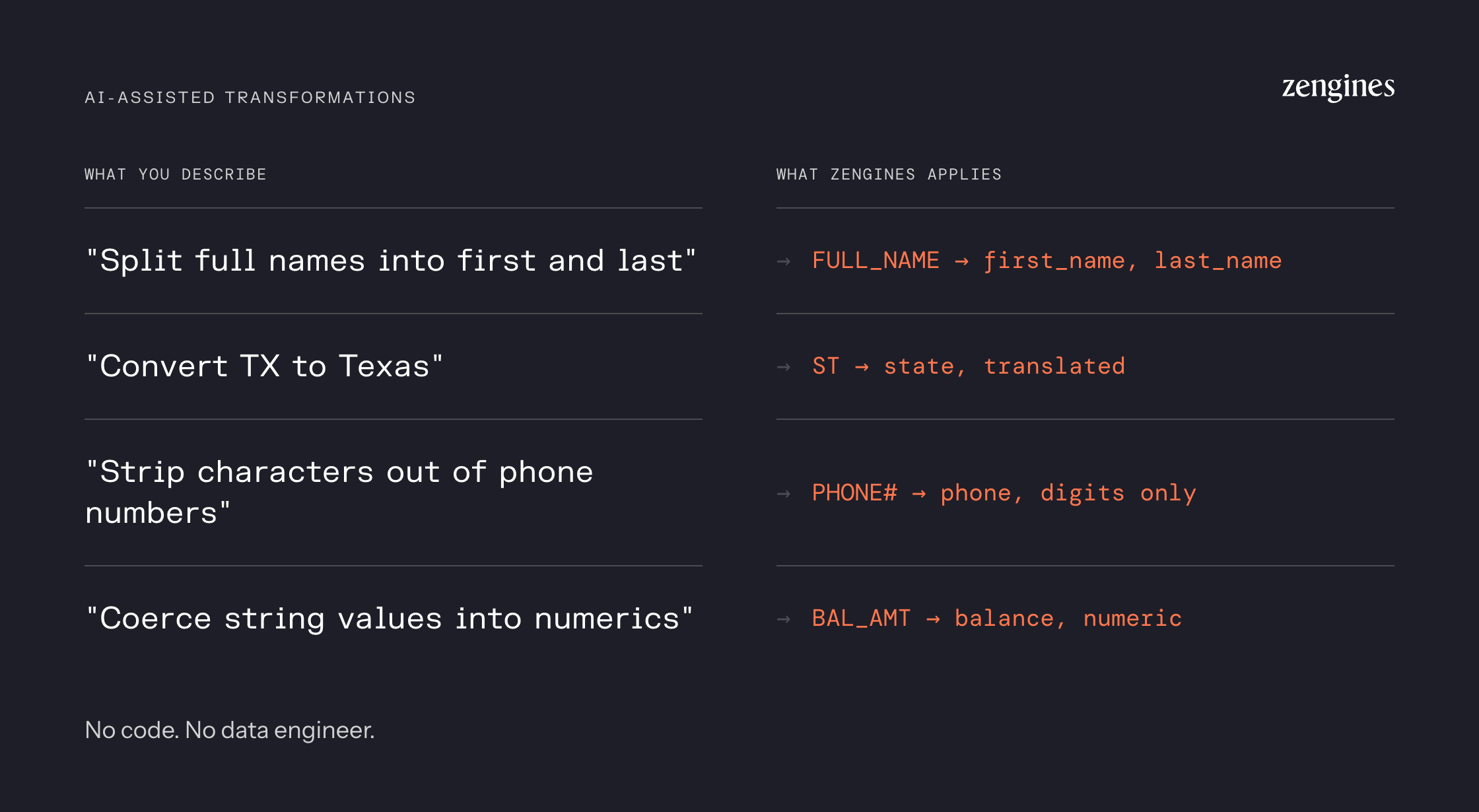
Need to split full names into first and last? Convert “TX” to “Texas”? Strip characters from phone numbers, or coerce string values to numeric?
Describe the rule you want in plain English and Zengines generates it. Test it, adjust it, apply it — without writing code, filing an engineering ticket, or waiting on a data engineer’s sprint.
Data profiling and cleansing
The platform profiles incoming client data automatically, so hygiene issues, format inconsistencies, and type mismatches surface before they derail the project rather than after load. Anomalies, nulls, and outliers get flagged, with pre-built rules and AI-generated suggestions for fixing them.
For an implementation lead, this is the single most valuable early artifact: instant visibility into the size, scope, and quality of what the client just sent you — on day one, not week four.
Instant load file generation
Once mappings and rules are set, Zengines generates clean, validated load files immediately. No waiting on test environments, no bouncing between systems. Preview and approve the file in the interface, then push it into the target system with confidence.
Automated reconciliation
The step most onboarding processes skip until something breaks. Zengines compares source and target outputs automatically and surfaces the differences, so discrepancies get caught and explained during the conversion rather than discovered by your client afterward. At one Fortune 100 financial institution, this approach cut reconciliation breaks by 99%.
When the client is coming off a legacy core
Migrating a client off a mainframe or AS/400 platform is a different problem, and it’s the one we hear about most often. The hard part isn’t moving the data — it’s understanding what the data means.
Zengines Contextual Data Lineage parses COBOL, RPG, and PL/1 at scale and surfaces what is actually inside the legacy code: the calculation logic, conditional branches, hard-coded values, field-level relationships, and module-to-module dependencies that determine how the system produces what it produces. Analysts get plain-English answers to reverse-engineering questions in minutes instead of waiting weeks on a scarce mainframe specialist.
For an onboarding team, that means you can map a client’s legacy fields to your model correctly the first time — because you can see the business rule behind each one, not just the column header.
What changes, by role
Implementation and professional services leaders. Delivery timelines become predictable. Analysts run conversions end to end — up to 80% faster, with roughly 80% less engineering time — so onboarding stops competing with product development for the same engineers.
Product and migration owners. Time-to-value becomes something you own rather than something you report on. Every client conversion runs through one governed platform, which means the onboarding experience is consistent and improvable rather than dependent on who staffed it.
Executive sponsors. Onboarding stops being the bottleneck between a signed contract and recognized revenue. Client throughput decouples from services headcount, so growth no longer requires hiring ahead of it.
Onboarding is where retention and referrals get decided
There’s a reason onboarding gets outsized attention from customer success teams: it’s the first time a client experiences your company delivering rather than selling. Whatever happens in those first weeks becomes the story they tell internally about your product — and the story they tell other buyers.
A client who spent six weeks re-exporting spreadsheets and chasing validation errors has already formed a view. They may not churn over it, but they won’t take the reference call either. They’ll hedge in the renewal conversation. And when a peer asks how the implementation went, they’ll answer honestly.
The inverse compounds just as hard. Clients who go live quickly and cleanly start using more of the product sooner, hit their own internal success metrics earlier, and are far more willing to serve as references, case studies, and referral sources. In markets where buyers check with peers before they check with vendors, that’s a direct revenue input — not a soft one.
The most reliable lever here isn’t a better project plan. It’s reducing how much work the client has to do. Every iteration your team absorbs is one the client doesn’t experience as homework, and every quality issue you catch before load is one they never see in their own data. Automating mapping, rule generation, and validation doesn’t just shorten the timeline — it moves the burden off the customer, which is what they actually remember.
A customer data onboarding readiness checklist
Before you kick off the next client conversion, run through this:
- Do you know what the client is actually sending? Get a real data sample and profile it before committing to a timeline. Not a schema description — the data.
- Is the mapping documented, or is it in someone’s head? If your field mapping only exists in an analyst’s working file, it cannot be reused, reviewed, or defended.
- Are the conversion rules readable by a non-engineer? Rules buried in scripts are rules only one person can maintain.
- Do you know the data quality picture before load, not after? Profiling early is the difference between a two-week onboarding and a two-month one.
- Can you reconcile source to target automatically? If reconciliation is manual sampling, you are relying on your client to find your errors.
- Do you understand the client’s source system, or just its output? For legacy cores especially, the field name is not the meaning.
- Will anything you build here be reusable on the next client? If the answer is no, you are running a project, not a capability.
- Can you explain, afterward, how any given value got where it is? If a client asks six months from now why a field looks the way it does, someone should be able to answer without reopening the project.
Your product’s AI runs on the data you onboarded
If you’re onboarding customers onto a software platform right now, you’re almost certainly also shipping AI features — a copilot, anomaly detection, forecasting, automated recommendations, agents that act on the customer’s behalf. And here’s the part that’s easy to miss: those features don’t run on your data. They run on each customer’s data, in the state your onboarding process left it.
That makes data onboarding an AI problem, whether or not anyone on the team frames it that way.
Consider what a rushed conversion actually produces. A field mapped to approximately the right target. A code value that didn’t have a clean equivalent, so someone picked the closest one. Nulls that got defaulted rather than resolved. A rule applied because a client asked for it on a call, never written down anywhere.
None of that surfaces as a migration defect. The load succeeds, the client goes live, everyone moves on. It surfaces months later, as your AI feature producing a confidently wrong answer for that one customer — and the customer attributes it to your product, because from where they sit, that’s exactly what it is. Worse, it’s difficult to diagnose, because nobody currently on the account remembers how that field was mapped.
Two things make onboarded data genuinely ready for the AI in your product. It has to arrive usable — complete, correctly typed, and consistent with your data model rather than approximately consistent with it. And it has to be explainable — with the mapping decisions and rule logic recorded, so that when a customer asks where an AI-generated number came from, or your own team needs to debug a model behaving oddly for one account, the answer is retrievable instead of lost.
Running every conversion through one governed platform produces both as a byproduct. The mappings, the rules, the quality exceptions, and the reconciliation results are all captured because that’s how the work was done — not because someone remembered to document it afterward. Which means the AI roadmap you’re building doesn’t inherit a data problem from the implementation team. (More on what makes data AI-ready.)
Make data onboarding a growth lever, not a bottleneck
Data onboarding doesn’t have to be the painful part of your client implementation. Done on the right platform, it becomes one of the strongest things about your offering — the reason clients go live sooner, form a better first impression, and start generating revenue faster. That’s the outcome we built Zengines to produce.
You can scale implementations without scaling your services team. You can decouple client throughput from engineering capacity. And you can turn “how fast can you get our data in?” from an awkward question into a competitive answer.

Frequently asked questions
What is customer data onboarding?
Customer data onboarding is the process of moving a new client’s existing data into your system so they can begin using it — mapping their fields to your data model, reformatting values, validating quality, and loading the result. It is the data-side half of client implementation and typically the step that determines the go-live date.
How is data onboarding different from data migration?
Data migration is the general practice of moving data between systems. Customer data onboarding is a recurring instance of it: the same problem solved again for every new client, with a different source system each time. That recurrence is why onboarding rewards a repeatable platform rather than a per-client project.
How long does customer data onboarding take?
It depends on data volume, source-system complexity, and how much reformatting is required. Manual approaches commonly run weeks to months per client. Running conversions on the Zengines Turnkey Data Migration Platform reduces that by up to 80%, because mapping, rule generation, validation, and reconciliation are automated rather than hand-built each time.
Can AI automate customer data onboarding?
Yes, for the parts that consume the most time. AI can predict field mappings between a client’s source schema and your target model, generate conversion rules from plain-English descriptions, profile incoming data for quality issues, and reconcile source against target after load. A business analyst still makes the judgment calls — the AI removes the manual work around them.
What causes client data migrations to fail?
Most failures trace to the same causes: source data that doesn’t match the assumed structure, mapping decisions made without understanding what a field actually means, quality problems discovered after load rather than before, and no automated reconciliation to catch discrepancies before the client does.
Who should run customer data onboarding — engineers or business analysts?
Business analysts, on a platform built for them. Analysts understand the business meaning of the data, which is the hard part; engineers are typically brought in only because the tooling requires code. Removing that requirement moves onboarding off the engineering queue and shortens the cycle substantially.
Does customer data onboarding affect the AI features in my product?
Directly. AI features run on each customer’s data in whatever state onboarding left it, so mapping errors, unresolved quality issues, and undocumented rules surface later as wrong AI output for that account — and customers attribute that to the product, not the migration. Onboarding data that arrives complete and correctly mapped, with the mapping and rule logic recorded, is what keeps product AI reliable account by account.
Zengines helps software companies and service providers onboard client data faster with the Turnkey Data Migration Platform — AI-led mapping, plain-English conversion rules, and automated validation and reconciliation, run by business analysts without writing code.